Every developer knows the feeling: you've just shipped a solid release, and someone asks "what changed?" You stare at git log --oneline and feel a deep sense of dread.
fix: stuff
wip
refactor auth again
hotfix prod URGENT
added the feature finally pls work
That's the problem ShipLog solves. Here's how we actually built it — the architecture, the decisions, the tradeoffs, and the parts that didn't work the first time.
The Core Insight
The raw material for a great changelog already exists inside every repository. It's just not readable by humans yet.
Commits contain the full history of what changed: which files were touched, which lines were added or removed, what the developer was thinking when they wrote the message. The problem is that commits are written for developers in the moment — not for users, managers, or teammates reading them three days later.
ShipLog's job is translation. Not summarization. Translation.
The difference matters: a summarizer compresses information. A translator changes the register — from technical shorthand to human language — without losing what actually happened. To do that well, you need more than the commit message. You need the diff.
That single realization shaped most of what we built.
The Full Pipeline
Here's how a generation flows through the system, end to end:
Here's the full sequence diagram showing how each service talks to the next:
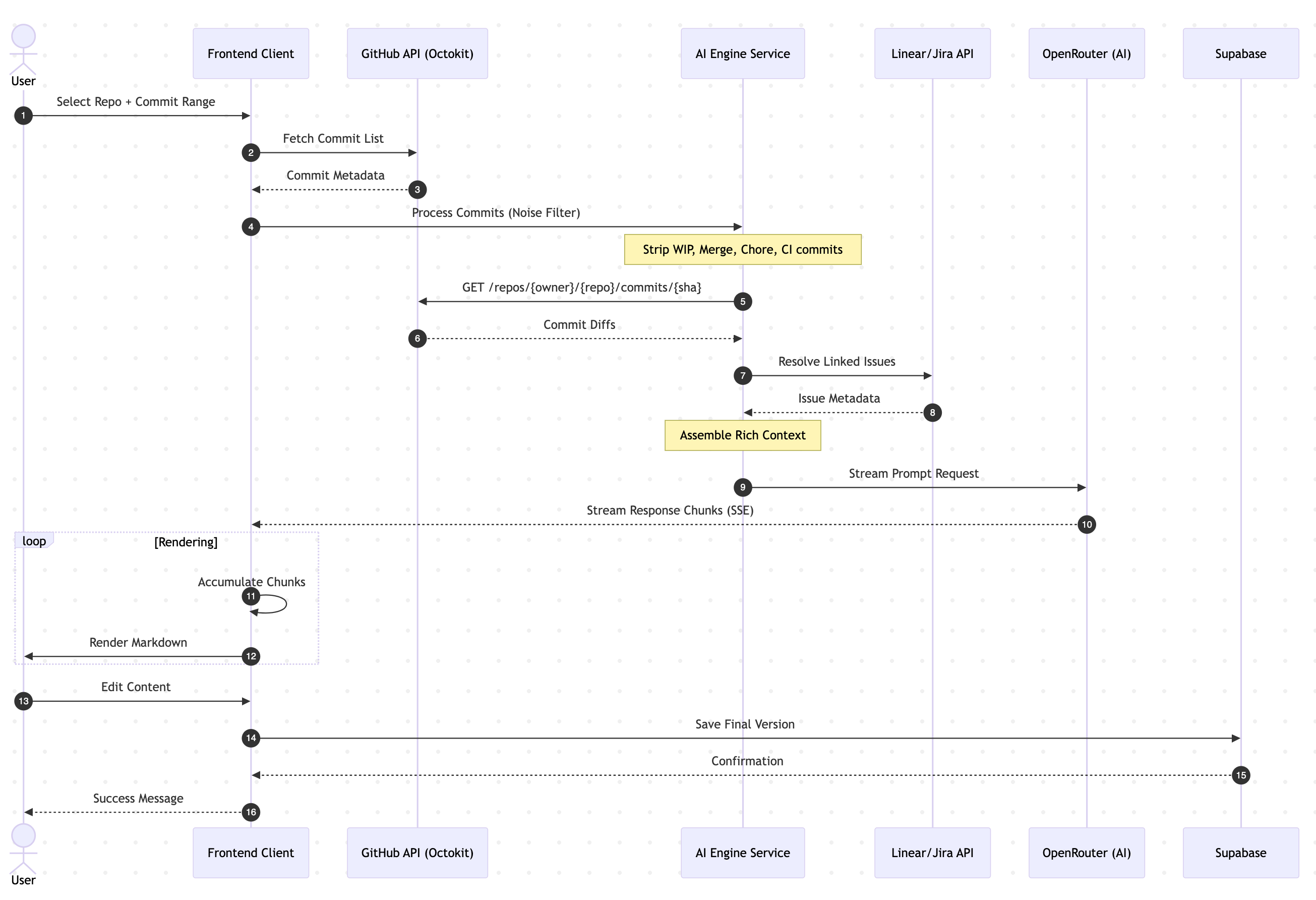
Each step has real decisions behind it. Let's go through them.
Step 1 — Fetching Commits with Octokit
We use Octokit REST to talk to GitHub. The user authenticates via GitHub OAuth through Clerk, and we get a provider token back that lets us call the API on their behalf.
For fetching a commit range, we use the compare endpoint:
const { data } = await octokit.rest.repos.compareCommitsWithBasehead({
  owner,
  repo,
  basehead: `${options.from}...${options.to ?? "HEAD"}`,
  per_page: options.limit ?? 50,
})

return data.commits.map((c) => ({
  sha:     c.sha,
  message: c.commit.message.split("\n")[0], // first line only
  author:  c.commit.author?.name,
  date:    c.commit.author?.date,
}))
We take the first line of the commit message only — anything after the first newline is usually either a body explanation (which we'll get from the diff anyway) or blank. This keeps the input clean.
One thing we learned quickly: the basehead format (base...head) is much more reliable than passing base and head separately when dealing with forks and non-linear histories. It handles the three-dot diff semantics correctly.
Step 2 — Noise Filtering
Before anything reaches the AI, we run every commit through two levels of noise filtering: commit-level and file-level.
Commit-level filtering
const NOISE_COMMIT_PATTERNS = [
  /^wip\b/i,
  /^merge\s+(branch|pull request)/i,
  /^chore(\(.+\))?:\s*/i,
  /^ci(\(.+\))?:\s*/i,
  /^ci\/cd/i,
  /^bump version/i,
  /^update (package|yarn|pnpm|npm)/i,
  /^release v?\d+/i,
]

function isNoiseCommit(message: string): boolean {
  return NOISE_COMMIT_PATTERNS.some((p) => p.test(message.trim()))
}
Merge commits, CI/CD changes, version bumps, WIP commits — none of these belong in a changelog. They're internal signals, not user-facing changes.
If filtering removes everything (rare but possible on branches with heavy CI activity), we fall back to the unfiltered list rather than producing an empty changelog.
File-level filtering
Even within meaningful commits, certain files are noise. Lock files tell you nothing about what the product does. Compiled output, dist folders, and env files are either machine-generated or secrets. We strip them before building the diff context:
const NOISE_FILE_PATTERNS = [
  /package-lock\.json$/,
  /pnpm-lock\.yaml$/,
  /yarn\.lock$/,
  /\.lock$/,
  /\.min\.(js|css)$/,
  /dist\//,
  /\.next\//,
  /node_modules\//,
  /\.env/,
]
Fewer tokens. Better signal. The AI doesn't need to know that your lockfile updated 4,000 lines when you added one dependency.
Step 3 — Fetching File Diffs (The Pro Difference)
This is the feature that changed our output quality the most, and the one that required the most careful engineering.
When a user is on the Pro or Team plan, we fetch the actual code diff for each commit — not just the message. For every commit SHA, we call:
GET /repos/{owner}/{repo}/commits/{sha}
This returns each file changed, with its patch — the unified diff showing exactly which lines were added or removed.
The implementation has two constraints that matter:
Concurrency cap. GitHub's authenticated rate limit is 5,000 requests per hour per user token. With 50 commits and up to 6 files each, you can burn through quota fast. We fetch diffs in batches of 5 concurrent requests:
const CONCURRENCY = 5

for (let i = 0; i < commits.length; i += CONCURRENCY) {
  const batch = commits.slice(i, i + CONCURRENCY)
  const diffs = await Promise.all(
    batch.map((c) => fetchCommitDiff(owner, repo, c.sha, token))
  )
  // ...
}
Patch truncation. A large refactor can produce a patch with thousands of lines. Sending all of that to the AI would burn tokens, slow down the response, and mostly add noise — the model doesn't need to read every changed line to understand that "the auth module was refactored to use JWT instead of session tokens." We truncate patches to 400 characters per file, which is enough to convey intent:
const PATCH_MAX_CHARS = 400

function trimPatch(patch: string): string {
  if (patch.length <= PATCH_MAX_CHARS) return patch
  return patch.slice(0, PATCH_MAX_CHARS) + "\n... (truncated)"
}
The result is a rich, dense context block for each commit that tells the AI: here's the message, here's what files changed, and here's a window into the actual code. That combination is what lets the model write something like:
Fixed session expiry not being reset on token refresh, which was causing logged-in users to be silently logged out after extended inactivity.
Instead of just:
Fixed auth bug.
Step 4 — Issue Resolution (Linear + Jira)
Many teams reference issue trackers in their commit messages — feat: add dashboard filters (ENG-234) or fix: PROJ-89 rate limit bypass. These identifiers are gold, because the issue title is usually a plain-English description of exactly what changed.
We extract them with a simple regex:
const ids = [...c.message.matchAll(/\b([A-Z]+-\d+)\b/g)].map((m) => m[1])
For Linear, we fetch via OAuth using the GraphQL API:
const query = `
  query($ids: [String!]!) {
    issues(filter: { identifier: { in: $ids } }) {
      nodes { identifier title state { name } }
    }
  }
`
For Jira, we use Basic auth with an API token:
GET /rest/api/3/search?jql=issueKey IN (PROJ-89, PROJ-91)
The resolved titles get injected into the prompt as annotations:
- a04f221 fix: rate limit bypass (ENG-89)
  [Linear: "Users can bypass API rate limits using malformed headers" · Done]
  Files changed:
  • src/middleware/rateLimit.ts (modified) +12 -3
This is the single biggest quality boost for teams. Instead of the AI guessing what fix: ENG-89 means, it knows exactly what the issue was about — in the developer's own words from when they wrote the ticket.
Step 5 — Building the Prompt
The prompt is the most important piece of engineering in the whole pipeline. We spent more time iterating on it than on anything else.
The final structure looks like this:
function buildPrompt(details, repo, branch, linearIssues) {
  const list = details
    .filter((c) => !isNoiseCommit(c.message))
    .map((c) => {
      const linearContext = resolveLinearContext(c, linearIssues)
      const fileSummary   = buildFileSummary(c.files)
      const patches       = buildPatchContext(c.files)

      return [
        `- ${c.sha.slice(0, 7)} ${c.message} (${c.author}, ${c.date})`,
        linearContext && `  ${linearContext}`,
        fileSummary   && `  Files changed:\n${fileSummary}`,
        patches       && `  Key diffs:\n${patches}`,
      ].filter(Boolean).join("\n")
    })
    .join("\n\n")

  return `You are a technical writer. Transform these raw Git commits from "${repo}"
(branch: ${branch}) into a clean, human-readable changelog in Markdown.

Each commit includes:
- The commit SHA and message
- Files changed with line counts
- Key diff patches showing exactly what changed

Use the file names and diff patches to write SPECIFIC entries.
Instead of "Fixed auth bug", write "Fixed session expiry not being reset on token refresh."

Rules:
- Group under: ### ✨ New Features / ### 🐛 Bug Fixes / ### ♻️ Improvements / ### ⚠️ Breaking Changes
- Start with: ## [version]
- One line per change — concise and specific
- Remove noise entirely: wip, merge commits, ci changes
- Do NOT invent features not evidenced by the commits

${list}

Output ONLY valid Markdown. No preamble.`
}
A few things we got wrong in early versions:
We initially asked the model to infer version numbers. It would hallucinate versions like v3.2.1 with zero basis in the commits. We stopped asking — now we just output ## [version] as a placeholder the user fills in.
We didn't have the file/patch context at first. The output was generic and often wrong — the model was pattern-matching on commit messages, not understanding what changed. Adding the diff context was the single biggest quality improvement.
We tried asking for JSON output. The idea was to parse it into structured data. In practice, the model would occasionally produce malformed JSON, and the streaming made parsing unreliable anyway. Plain Markdown streams beautifully and is what users actually need.
Step 6 — Streaming via OpenRouter
We route all AI calls through OpenRouter, which gives us access to multiple model providers under a single API key. The model selection is based on plan tier:
const model = plan === "free"
  ? "anthropic/claude-3-haiku"
  : "anthropic/claude-3.5-sonnet"
Free users get Haiku — fast, cheap, good enough for short commit ranges. Pro and Team users get Sonnet — significantly better at maintaining consistency across long changelogs and handling complex diffs.
The route handler streams directly from OpenRouter to the client:
const upstream = await fetch("https://openrouter.ai/api/v1/chat/completions", {
  method: "POST",
  headers: {
    "Authorization": `Bearer ${apiKey}`,
    "Content-Type":  "application/json",
    "HTTP-Referer":  process.env.NEXT_PUBLIC_APP_URL,
    "X-Title":       "ShipLog",
  },
  body: JSON.stringify({
    model,
    stream:     true,
    messages:   [{ role: "user", content: prompt }],
    max_tokens: 1500,
  }),
})

return new Response(upstream.body, {
  headers: {
    "Content-Type":  "text/event-stream",
    "Cache-Control": "no-cache",
    "Connection":    "keep-alive",
  },
})
No buffering — we pipe the response body directly. This means the first token appears on the client in under a second, and the changelog streams in word by word. It feels fast even when the full generation takes 8–10 seconds.
On the client, we read the SSE stream:
const reader = response.body.getReader()
const decoder = new TextDecoder()
let accumulated = ""

while (true) {
  const { done, value } = await reader.read()
  if (done) break

  const chunk = decoder.decode(value)
  const lines = chunk.split("\n").filter((l) => l.startsWith("data: "))

  for (const line of lines) {
    const data = line.replace("data: ", "")
    if (data === "[DONE]") break

    const parsed = JSON.parse(data)
    const token  = parsed.choices?.[0]?.delta?.content ?? ""
    accumulated += token
    setChangelog(accumulated) // React state update on every token
  }
}
Each state update re-renders the Markdown preview in real time. The user watches the changelog appear, which is both useful (they can see if it's going wrong early) and, honestly, satisfying.
Error Handling — The Parts That Actually Fail
A few failure modes we had to handle carefully:
OpenRouter credit exhaustion. When the API key runs out of credits, the response is a 402 with a specific error body. We surface this as a clear message rather than a generic "something went wrong."
GitHub rate limit during diff fetching. If a user has already burned most of their 5,000 requests today, the diff fetch silently fails for some commits. We handle this gracefully — if a diff call returns non-200, we continue without that commit's diff rather than failing the whole generation.
The empty result. Sometimes the noise filter removes every commit. Rather than passing an empty list to the AI (which produces strange output), we detect this and fall back to the unfiltered list with a warning.
Stream interruption. If the user closes the tab mid-stream, nothing bad happens — we just stop writing to React state. The partial result isn't saved to Supabase until the user explicitly clicks Save.
The Database Layer
We use Supabase for persistence. The main table is straightforward:
create table changelogs (
  id           uuid primary key default gen_random_uuid(),
  user_id      text not null,
  repo_name    text not null,
  repo_owner   text not null,
  slug         text unique not null,
  content_md   text not null,
  range_from   text,
  range_to     text,
  commit_count int,
  model_used   text,
  is_public    boolean default true,
  created_at   timestamptz default now()
);

alter table changelogs enable row level security;

create policy "Users see own changelogs"
  on changelogs for select
  using (user_id = auth.jwt() ->> 'sub');

create policy "Public changelogs readable by all"
  on changelogs for select
  using (is_public = true);
Row Level Security means we never have to remember to filter by user_id in application code — the database enforces it. Public changelogs (which have shareable URLs) are readable by anyone without auth. Private changelogs are only accessible to the owner.
Observability
We run Sentry on both client and server for error tracking. The most valuable integration is capturing failed generation attempts with context:
Sentry.captureException(err, {
  tags:  { route: "generate", plan: user.plan },
  extra: { repoOwner, repoName, commitCount: commits.length, model },
})
For product analytics, PostHog tracks the events that actually tell us if the product is working: generation_triggered, generation_completed, generation_failed, upgrade_clicked, plan_purchased. We don't track pageviews obsessively — we track actions.
The funnel we care about most is: signed_up → repo_connected → generation_triggered → changelog_published. The drop-off between repo_connected and generation_triggered is the number we optimize hardest. If someone connects a repo and never generates, the product failed them somewhere.
The MCP Server — Generating Changelogs from Inside Your Editor
The most recent layer we added is a Model Context Protocol server, published as shiplog-mcp on npm.
MCP is an open standard that lets AI assistants (Cursor, Claude Desktop, and others) call external tools defined as structured functions. Instead of switching to a browser to generate a changelog, you can now ask Cursor directly:
Generate a changelog for acme/backend using my GitHub token ghp_xxx
And it will call the ShipLog MCP server, which runs the full pipeline — commit fetching, noise filtering, diff context, AI generation, and Supabase persistence — and returns the Markdown with a public URL, all without leaving the editor.
The server is a standalone Node.js package using the @modelcontextprotocol/sdk stdio transport:
const server = new Server(
  { name: "shiplog", version: "1.0.0" },
  { capabilities: { tools: {} } },
)

server.setRequestHandler(CallToolRequestSchema, async (req) => {
  const { name, arguments: args } = req.params

  if (name === "generate_changelog") {
    const res = await fetch(`${API_BASE}/api/v1/generate`, {
      method: "POST",
      headers: {
        "Authorization": `Bearer ${API_KEY}`,
        "Content-Type":  "application/json",
      },
      body: JSON.stringify(args),
    })
    const data = await res.json()
    return { content: [{ type: "text", text: JSON.stringify(data, null, 2) }] }
  }
})
The MCP server itself has no AI logic — it delegates entirely to /api/v1/generate, the same REST endpoint available to any Team plan user. This means the server stays thin and stateless: it's just a typed bridge between your AI assistant and the ShipLog API.
One non-obvious decision: the /api/v1/* routes use createAdminClient() instead of the standard Supabase client to look up API keys. The standard client is subject to Row Level Security — and since API key lookups happen outside of a user session (the caller is an API token, not a logged-in browser), RLS would block the query. The admin client uses the service role key and bypasses RLS for this specific, trusted lookup only.
To add it to Cursor, it's a one-line config — no build step, no cloning:
{
  "mcpServers": {
    "shiplog": {
      "command": "npx",
      "args": ["-y", "shiplog-mcp"],
      "env": { "SHIPLOG_API_KEY": "sl_live_your_key" }
    }
  }
}
What's Coming
A few things we're actively building:
JS embed widget. A <script> tag you drop into any webpage that renders your latest changelog inline. Publishers who want to show release notes on their docs site without maintaining a separate page.
Auto-generation on push. A GitHub webhook that triggers a generation automatically when you push to main or create a release tag. The changelog exists before you even open the dashboard.
GitLab support. The architecture is provider-agnostic — Octokit is the only GitHub-specific layer. Adding GitLab is mostly a matter of mapping their API responses to our internal commit format.
Send direct. Connect your Gmail or SMTP credentials and send the changelog as an email directly from ShipLog. No copy-pasting into Mailchimp.
If you want to try what we've built, the free plan gives you five generations a month — enough to ship a real changelog for your next five releases and see if it changes how your team communicates.
And if you're building something in this space, or you have strong opinions about AI-generated documentation, I'd genuinely enjoy talking about it — admin@shiplog-app.com.